Prominent Website Feature
The Signup Form
The Signup Form is the central customer workflow. It validates account information, adjusts to the selected signup type, calculates pricing and savings, applies eligible offers, and feeds the resulting request into onboarding.
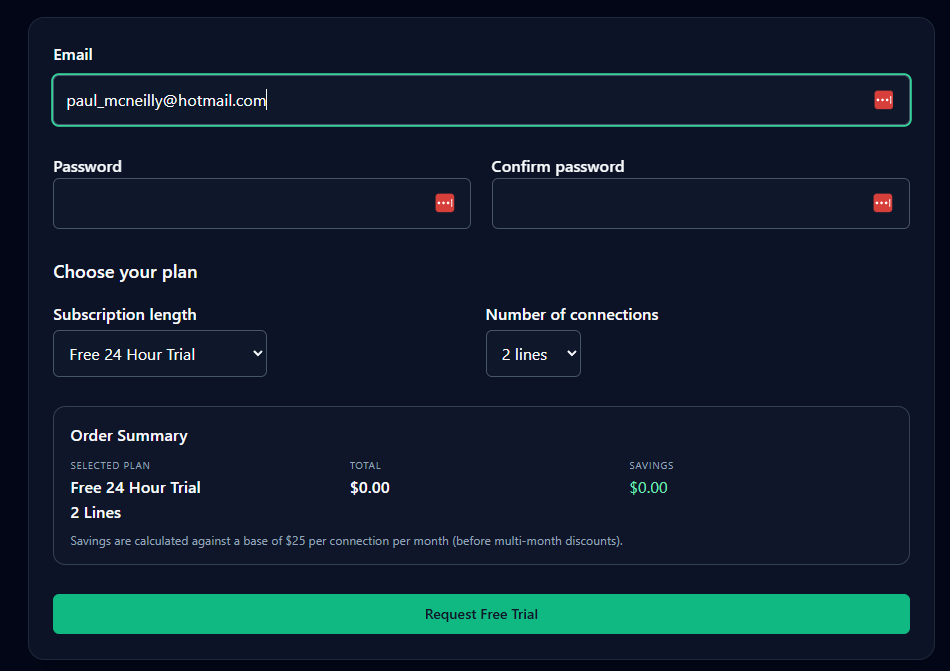
Account information
The form collects the email address, password, and password confirmation needed to begin onboarding. Email and password-related checks are performed before the request is accepted so common input errors can be corrected immediately.
Plan and connection selection
Visitors choose a subscription length and the required number of connections. Pricing-related selections update the Order Summary automatically so the visitor can see the current plan, total, and savings before continuing.
Free trial vs. paid subscription
| Behavior | Free 24 Hour Trial | Paid Subscription |
|---|---|---|
| Order total | $0.00 | Calculated from the selected plan and options |
| Coupon code | Not shown | Available when the subscription is coupon-eligible |
| Primary action | Request Free Trial | Continue to Bitcoin Payment |
| Next step | Trial request enters onboarding | Customer continues through the Bitcoin payment workflow |
Live Order Summary and savings
The Order Summary reflects the visitor's current choices and applicable offer rules. As selections change, pricing and savings are recalculated so the visitor can confirm the effective order before proceeding.
- Selected subscription or trial.
- Number of connections.
- Current total.
- Calculated savings.
- Applicable referral, promotional, or coupon discount.
The help site should describe how pricing is calculated without hard-coding values that may change. The live signup site remains the source of truth for current prices and configured discounts.
Coupon codes
Eligible paid subscriptions can expose a coupon-code field. A submitted code is validated against the configured rules, and an accepted discount is reflected in the Order Summary.
The customer experience should clearly communicate:
- whether the coupon was accepted;
- the discount applied;
- the updated savings and total; and
- why an invalid, expired, or ineligible coupon cannot be used.
Referral discounts
Referred clients can receive a configured referral offer. Referral information can affect both pricing and presentation, allowing the signup page to recognize the campaign, apply the referral discount, display customized messaging, and show a referral-specific banner.
The Admin Manual should define coupon/referral precedence and whether discounts can stack. This public guide should follow the application's actual configured behavior once that rule is finalized.
Custom and scheduled banners
The signup website supports configurable banners for holiday messages, special events, referral campaigns, promotions, and temporary announcements. Campaign scheduling allows content to be prepared in advance and displayed only during the intended period.
- Custom message/content.
- Enabled or disabled state.
- Scheduled start and end date/time.
- Holiday, promotion, referral, or special-event use.
- Campaign/referral-specific presentation.
Automated onboarding
The form is not merely a contact form. It is the front end of the onboarding workflow and provides administrators with the information and state needed to continue provisioning.